



Gallery operations collapse in predictable places. The same failures recur at the same handoff points—usually between the same departments—right when coordination matters most.
Many galleries treat each exhibition like it's their first: new checklists, forgotten lessons, and last-minute scrambles. These are system failures caused by informal coordination instead of documented workflows with clear decision gates.
Why exhibitions actually fail operationally
Exhibition failures rarely stem from curatorial vision. They come from dropped handoffs between planning and execution. A typical show involves hundreds of distinct operational tasks; missing a few percent creates numerous failure points.
-
Planning phase (weeks 1–8)
35 contract items; 22 budget reconciliations; 18 venue tasks; 45 artist coordination points; 28 marketing asset needs
-
Pre-installation (weeks 9–11)
15 shipping confirmations; 12 insurance validations; 8 conservation checks; 24 supply orders; 19 crew scheduling items
-
Installation (week 12)
32 artwork handling procedures; 14 lighting adjustments; 9 label placements; 11 security configs; 22 documentation requirements
-
Exhibition run (weeks 13–20)
daily condition reports; 6 weekly maintenance checks; 14 event coordinations; ongoing sales tracking; visitor flow adjustments
-
Deinstallation (week 21)
28 removal procedures; 15 shipping preparations; 12 return confirmations; 8 space restoration tasks; final documentation
Each task crosses roles: curator, registrar, preparator, marketing, sales, and education. Without documented handoffs, changes in one area frequently fail to reach others, producing preventable operational failures.
The hidden complexity of gallery coordination
Small galleries amplify coordination risk because staff wear multiple hats. Nobody often owns the end-to-end process, so documentation and responsibilities fall through when pressure rises.
Installation week exposes these gaps. Example: preparator finds artwork delayed Monday; curator is away; registrar can't access works for condition reports; marketing lacks install photos.
Tuesday: incoming works exceed expected dimensions, forcing wall repainting and delaying photography and press materials. Wednesday: curator adjusts flow, creating more delays for education and events.
These are not random disasters but predictable outcomes when operational handoffs exist only in people’s heads rather than in documented systems.
Building decision gates that actually work
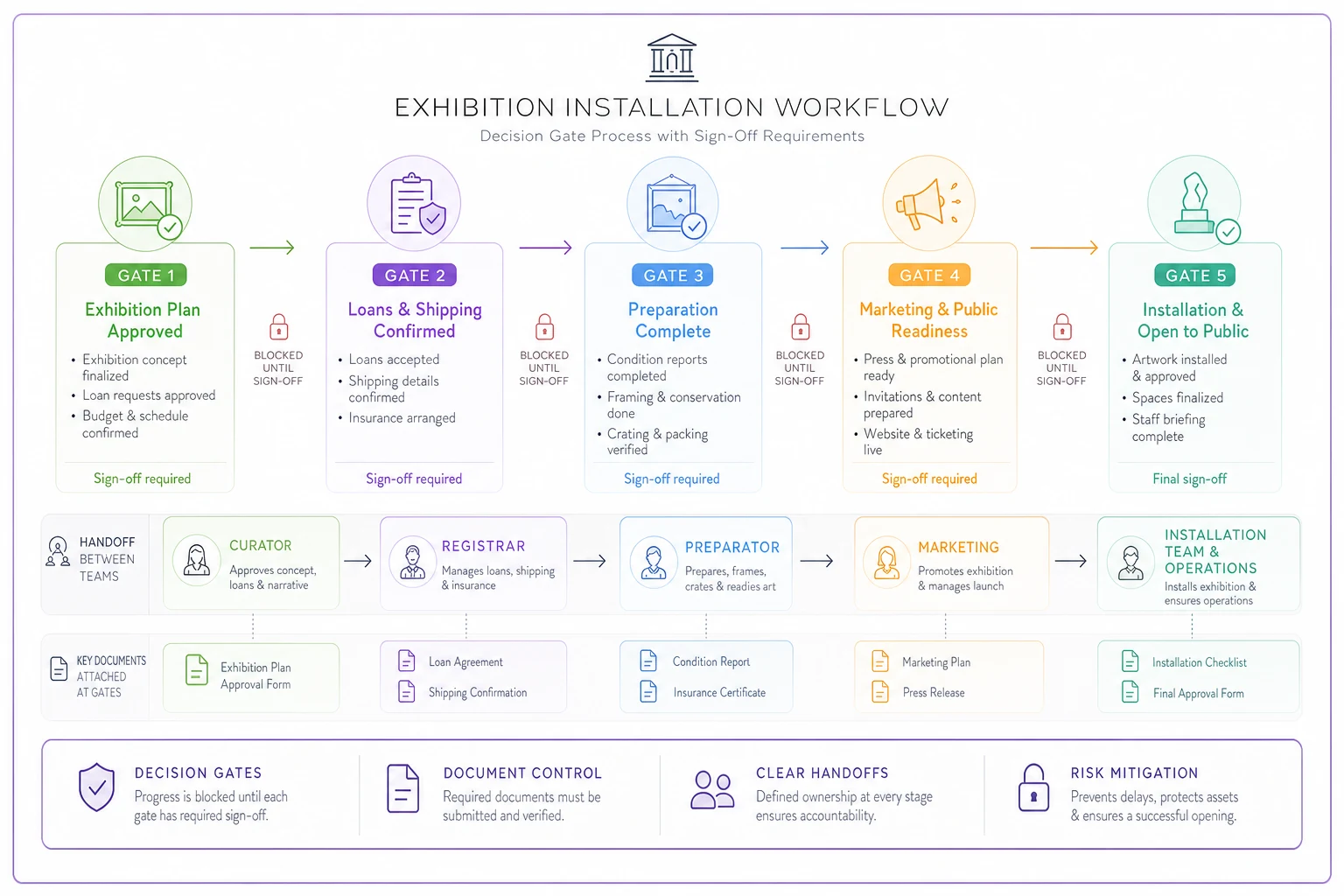
Decision gates are checkpoints that halt progress until previous phases are verified. Unlike ignored checklists, gates assign accountability: work cannot proceed without explicit pass conditions and attachments.
Gate 1: Curatorial Package Complete — Timeline: 10 weeks before opening. Owner: Curator.
-
Final artwork list locked
-
All loan agreements signed
-
Installation requirements documented
-
Conservation needs identified
-
Artist contracts executed
Handoff to: Registrar and Preparator.
Gate 2: Logistics Package Confirmed — Timeline: 8 weeks before opening. Owner: Registrar.
-
Shipping arranged and confirmed with ETAs
-
Insurance certificates obtained
-
Condition reports scheduled
-
Import/export permits secured
-
Customs documentation prepared
Handoff to: Preparator and Marketing.
Gate 3: Production Ready — Timeline: 6 weeks before opening. Owner: Preparator.
-
Floor plan finalized
-
Wall preparation scheduled
-
Equipment and supplies ordered
-
Crew assignments confirmed
-
Installation schedule distributed
Handoff to: Installation team.
Gate 4: Marketing Launch Ready — Timeline: 4 weeks before opening. Owner: Marketing lead.
-
All artwork images received
-
Press release approved
-
Exhibition text finalized
-
Invitation list confirmed
-
Social media assets created
Handoff to: Public programs.
Gate 5: Installation Complete — Timeline: 3 days before opening. Owner: Preparator.
-
All artwork installed and lit
-
Labels placed and verified
-
Security measures activated
-
Photography completed
-
Condition reports filed
Handoff to: Operations team. Gates should require specific attachments (e.g., shipping confirmations with tracking numbers, insurance certificates) before a PASS is recorded.
The SOP library that prevents recurring mistakes
Standard Operating Procedures capture institutional knowledge so work doesn't live only in staff heads. Keep SOPs short, practical, and focused on recurring or high-risk tasks.
Planning SOPs
-
Artist communication protocol
-
Loan agreement process
-
Budget development template
-
Timeline creation method
-
Risk assessment procedure
Logistics SOPs
-
Shipping coordination workflow
-
Insurance verification steps
-
Condition reporting standards
-
Custom clearance checklist
-
Crate handling procedures
Installation SOPs
-
Artwork handling protocols
-
Wall preparation standards
-
Lighting adjustment guidelines
-
Label production specifications
-
Documentation requirements
Maintenance SOPs
-
Daily inspection routines
-
Climate monitoring procedures
-
Cleaning protocols
-
Incident response plans
-
Visitor flow adjustments
Deinstallation SOPs
-
Artwork removal sequence
-
Packing specifications
-
Return shipping process
-
Space restoration checklist
-
Final reporting requirements
Each SOP should include:
-
Step-by-step instructions
-
Required tools and materials
-
Safety considerations
-
Common failure points
-
Escalation procedures
-
Documentation templates
Make SOPs usable: a two-page procedure with photos beats a twenty-page manual nobody reads. Prioritize tasks that fail repeatedly or carry high risk.
Failure mode analysis for gallery operations
Identify common failure modes, document detection and response, and implement prevention measures. The table below lists frequent failures, their impact, and primary prevention methods.
| Failure Mode | Frequency | Impact | Prevention Method |
|---|---|---|---|
| Artwork arrives damaged | 2–3 per year | High - may cancel exhibition | Pre-shipping condition reports; approved shippers only |
| Wrong dimensions provided | 5–6 per year | Medium - requires replanning | Standardized measurement protocol; double verification |
| Insurance gaps discovered | 1–2 per year | High - liability exposure | Coverage audit at Gate 2; standardized minimums |
| Marketing materials contain errors | 8–10 per year | Low–Medium - credibility impact | Approval workflow; fact-checking protocol |
| Installation runs over schedule | 4–5 per year | Medium - delays opening | Time buffers; crew minimums; complexity scoring |
| Climate control failures | 2–3 per year | High - artwork damage | Redundant monitoring; response protocol; backup systems |
| Label information incorrect | 6–8 per year | Low - requires reprinting | Database verification; approval chain |
| Opening night logistics fail | 1–2 per year | Medium - reputation damage | Event checklist; vendor confirmations; day-of coordinator |
For each failure mode, document:
-
How to detect it early
-
Who needs to be notified
-
Immediate actions to take
-
How to prevent recurrence
-
Required documentation to create
Templates that eliminate repetitive planning
Templates prevent starting each exhibition from zero. Keep them simple and ensure the team actually uses them.
Essential exhibition templates
-
Exhibition planning template (timeline, budget categories, role tasking, risk register)
-
Installation guide template (room measurements, lighting positions, hanging heights, power locations)
-
Condition report template (terminology, measurements, photo requirements, damage classification)
-
Deinstallation checklist template (removal sequence, packing specs, outbound documentation)
See condition-report standards and safe handling at Handling, Packing and Storage - Collections Care Manual.
12-week timeline (compact)
Copy this table into your master schedule and require listed attachments before a gate is marked PASS. Replace week numbers with calendar dates.
| Week | Focus & deliverables (short) | Owner (primary → backup) | Gate / pass point (required attachments) |
|---|---|---|---|
| -12 → -10 | Initiation: confirm concept, final artwork list, issue & collect loan agreements, baseline budget, assign roles | Curator → Director | Gate 1 PASS: final artwork list; signed loan agreements; installation requirements |
| -9 → -8 | Logistics & insurance: book shippers, request permits, insure works, schedule inbound condition-report windows, begin crating | Registrar → Logistics | Gate 2 PASS: shipping bookings with ETAs; COIs; scheduled condition-report slots |
| -7 → -6 | Production planning: finalize floorplan/elevations, order lighting/hardware, place fabrication POs, confirm install crew & dates | Preparator / Production → Facilities | Gate 3 PASS: final floorplan/elevations; POs for equipment; install crew roster |
| -5 → -4 | Marketing & labels: collect approved images, finalize label CSV, event copy, ticketing page | Marketing → Events | Gate 4 PASS: approved images; label text CSV; press/event copy |
| -2 → -1 | Load-in & install: receive works, complete inbound condition reports, wall prep, hang, lighting focus, labels, onsite QA | Preparator / Installer → Registrar | Gate 5 PASS: item-by-item install sign-off; placement photos; completed inbound condition reports |
| 0 (Opening) | FOH briefing, safety walkthrough, staffing, ticketing; run sheet execution | FOH / Events → Ops | Opening PASS: FOH briefing complete; safety walkthrough signed |
| +1 → run | Exhibition run: regular condition rounds, programming, sales/reporting, monitor environment | Ops / FOH / Registrar → Curator | Ongoing: weekly condition-check log entries; exception escalations per SOP |
| Deinstall (2w before end → post-show) | Issue deinstall plan; pack, complete outbound condition reports, submit BOLs, confirm carrier pickup, restore space, final report | Preparator & Registrar → Logistics | Deinstall PASS: outbound BOLs; return condition reports; space restoration checklist; post-show report |
Require a named backup for every owner to avoid single-point failures. Keep gate attachments linked in the project file and enforce PASS only after all attachments are present.
How AI automation prevents coordination failures
AI-assisted operational software doesn't replace judgment; it ensures information reaches the right people at the right time, surfacing problems earlier.
-
Track task dependencies across departments
-
Flag missing documents before gates
-
Identify scheduling conflicts early
-
Monitor timeline slippage
-
Distribute updates to affected parties automatically
Automation reduces coordination overhead: automatic notifications, document tracking, and timeline monitoring surface issues weeks earlier. Galleries using AI-assisted platforms report roughly 60–70% fewer last-minute scrambles.
Scale considerations for growing galleries
Systems that work for a small slate of shows break down as exhibition frequency increases. The transition from 6 to 10 shows per year is the common pinch point.
-
4–6 exhibitions/year
one person can track most details; informal coordination often suffices
-
8–10 exhibitions/year
coordination complexity spikes; templates and enforced gates become essential
-
12+ exhibitions/year
manual tracking is impossible; departments must run independently and automation is necessary
Documented SOPs and clear decision gates are what prevent operational collapse during scale transitions.
Building your exhibition operations system
Start where problems repeat. You don't need 20 gates on day one—create a minimal set of gates and SOPs that address your most common failures.
-
Phase 1 — Document current state
map actual workflows and handoffs
-
Phase 2 — Create critical gates
start with 3–5 major transition gates
-
Phase 3 — Build essential SOPs
document procedures for repeated problems
-
Phase 4 — Develop templates
simple checklists and forms that get used
-
Phase 5 — Add automation
automate notifications, document tracking, and timeline monitoring
Expect about 3–4 months to build a functional system across 2–3 exhibition cycles. Refine procedures through use, not theory.
A documented exhibition operations system doesn't eliminate every problem, but it prevents repeated, preventable failures. It ensures knowledge persists, gates enforce accountability, and small issues surface before they cascade.
Start with one exhibition: document everything, add gates where handoffs fail, create SOPs and templates, then iterate. The goal is consistent reliability—not perfection.