


Most small galleries don't fail at technology because they picked the wrong tool. They fail because they tried to change five systems at once, during install week for a show, with a staff of three who already work weekends.
The mechanics of choosing software have been covered to death — and honestly, if you're still deciding on your archive, the decision matrix and migration plan for artwork archive software is a better starting point than this. What almost nobody talks about is the sequencing. The order you introduce systems, the capacity you have to absorb each one, and the handoffs between whoever set it up and whoever has to live with it every day.
This is a roadmap for that. Not "here are 12 tools you should buy," but a phased, capacity-aware plan — 30, 90, and 180 days — with an integration order that actually holds, plus the governance and sign-off pieces that keep a rollout from quietly rotting six weeks after the consultant leaves.
Why gallery rollouts stall (and it's rarely the software)
The pattern is consistent. A gallery decides to "get organized." Someone champions a new CRM. Two weeks later they also want the archive migrated, the viewing room live, and payments running through a new POS "while we're at it." Everything starts at once. Nothing gets finished.
What nobody accounts for: every new system has a learning tax and a data tax. The learning tax is the hours your staff lose figuring out where to click. The data tax is the mess of migrating, deduplicating, and cleaning records before the tool is actually usable. Run two or three migrations in parallel and you've stacked those taxes on top of your normal operating load — installs, openings, artist calls, invoices — and the whole thing collapses into "we'll deal with it after the next show." That next show never ends.
The second failure is invisible until it hits: integration order. Galleries tend to buy whatever tool is loudest that quarter — a slick viewing-room platform, say — and bolt it on before the underlying data is clean. Now your viewing room pulls from an archive full of inconsistent titles, missing dimensions, and three different spellings of the same collector's name. The tool works fine. Your data doesn't. And you've just automated the distribution of your mess.
A workable gallery technology adoption roadmap solves both problems by treating adoption as a sequence tied to staff capacity, not a shopping list tied to enthusiasm.
The integration-priority matrix: what to connect, and in what order
These systems have a natural dependency chain. Some tools are sources of truth and some are consumers of that truth. You always stabilize the source before you connect the consumer.
Never miss a key exhibition detail again.
Artioly helps you organize, promote, and manage every exhibition effortlessly.
- Unified exhibition scheduling
- Artist and visitor notifications
- Inventory and sales tracking
No credit card required
| System | Role in the chain | Depends on | What breaks if you rush it |
|---|---|---|---|
| CRM | Source of truth for people | Nothing (start here) | Duplicate collectors, broken nurture, wrong attribution on sales |
| Archive | Source of truth for objects | Clean-ish CRM for provenance links | Inconsistent titles/dimensions flowing everywhere downstream |
| Viewing Room | Consumer (people + objects) | Stable CRM + Archive | Beautiful pages built on wrong prices, sold works still shown "available" |
| POS / Invoicing | Consumer of everything | All three above | Tax errors, mismatched inventory, reconciliation nightmares |
The reason CRM goes first is boring but decisive: almost every downstream decision — who sees a viewing room, who gets an invoice, who counts as a returning collector — keys off contact data. If your contacts are noisy, everything built on top inherits the noise. If you're staring at a bloated, duplicate-riddled contact list right now, fixing that comes before any of this; the approach in cleaning up noisy CRMs with segmentation and nurture is essentially phase-zero for this whole roadmap.
One mistake worth naming: galleries love starting with the viewing room because it's the visible, exciting piece — the thing collectors actually see. But the viewing room only works when it's wired to discovery and fulfillment underneath. Lead with it and you're decorating a house with no foundation.
The 30/90/180 pilot recipes
The 30-day pilot: CRM foundation
Goal: One clean, trusted contact system that the whole team actually uses.
Don't migrate ten years of contacts. Migrate the people who matter — active collectors, artists, press, institutional contacts. What tends to work is a "last 24 months of activity plus all buyers" cutoff. Everything older goes into an archive export you can pull from later if needed.
-
1. Days 1–5 Export existing contacts. Deduplicate. Agree on the minimum required fields (name, email, type, last interaction, lifetime purchases). Fewer fields, filled consistently, beat forty fields left blank.
-
2. Days 6–15 Import the cleaned set. Set up 3–5 segments max — no elaborate taxonomy yet. Something like: active collectors, prospects, artists, press.
-
3. Days 16–25 Everyone logs interactions in one place for two weeks. No side spreadsheets. This is the behavior change that actually matters; the tool is secondary.
-
4. Days 26–30 Review. What fields are people ignoring? Where's the data still messy? Fix, then sign off.
Capacity check: roughly 3–5 hours a week for one person. If your team can't spare that, shrink the contact scope — don't extend the timeline, because open-ended rollouts die.
Keep pilot scope small enough that one person can own it without dropping their existing job.
The 90-day pilot: Archive integration
By now the CRM is stable and trusted. Now you bring objects online and start linking them to people.
Goal: A working archive where object records are consistent enough to feed a viewing room without embarrassment.
The trap here is completeness. Galleries try to catalog everything — including works that left the building in 2016. Don't. Pilot the archive on your current inventory plus consigned works actively for sale. That's the set that has to be right first.
-
1. Weeks 1–3 Define your object record standard — title format, dimension convention, medium vocabulary, status values (available / on hold / sold / consigned). Write it down. This single-page standard prevents the majority of the inconsistency mess.
-
2. Weeks 4–8 Enter active inventory against the standard. Link each work to its artist record in the CRM. Batch your photography so images land alongside records rather than in a separate folder nobody can find.
-
3. Weeks 9–11 Test the CRM↔archive link. Pull a "works by this artist" view. Pull a "what has this collector bought" view. If those two queries return clean answers, your foundation holds.
-
4. Week 12 Review data quality against the standard, correct, sign off.
Capacity check: cataloging is the hidden time sink. Budget roughly 15–25 minutes per work for a proper record including the CRM link, more if you're photographing at the same time. For a gallery entering 150 active works, that's real hours — spread it over the eight weeks, don't cram it.
The 180-day pilot: Viewing room + POS
Now, and only now, do the consumer systems come online. Both depend entirely on clean data from the first two phases, which is exactly why they wait.
Goal: Collectors can view works with accurate availability and pricing, and sales flow into a POS that reconciles against inventory.
-
1. Weeks 1–4 Configure the viewing room to pull from the archive. Test with one real collector interest — a live prospect looking at a small set of works. Watch for availability and price mismatches. This is where phase-one and phase-two shortcuts come back to bite you, so watch closely.
-
2. Weeks 5–8 Fix whatever the live test exposed. Usually it's status sync — a "sold" work still showing available — or price fields that never got standardized.
-
3. Weeks 9–14 Bring the POS online. Run it in parallel with your existing invoicing for a few real sales before cutting over. Never flip a payment system cold; parallel-run until reconciliation matches.
-
4. Weeks 15–18 Confirm the full loop — viewing room interest → sale → POS → inventory status update → CRM purchase history. When one collector journey runs end to end without manual patching, the pilot is done.
Capacity check: the POS phase needs your most detail-oriented person, because payment and tax errors are expensive and public. If that person is already maxed out, delay the POS piece rather than rushing it.
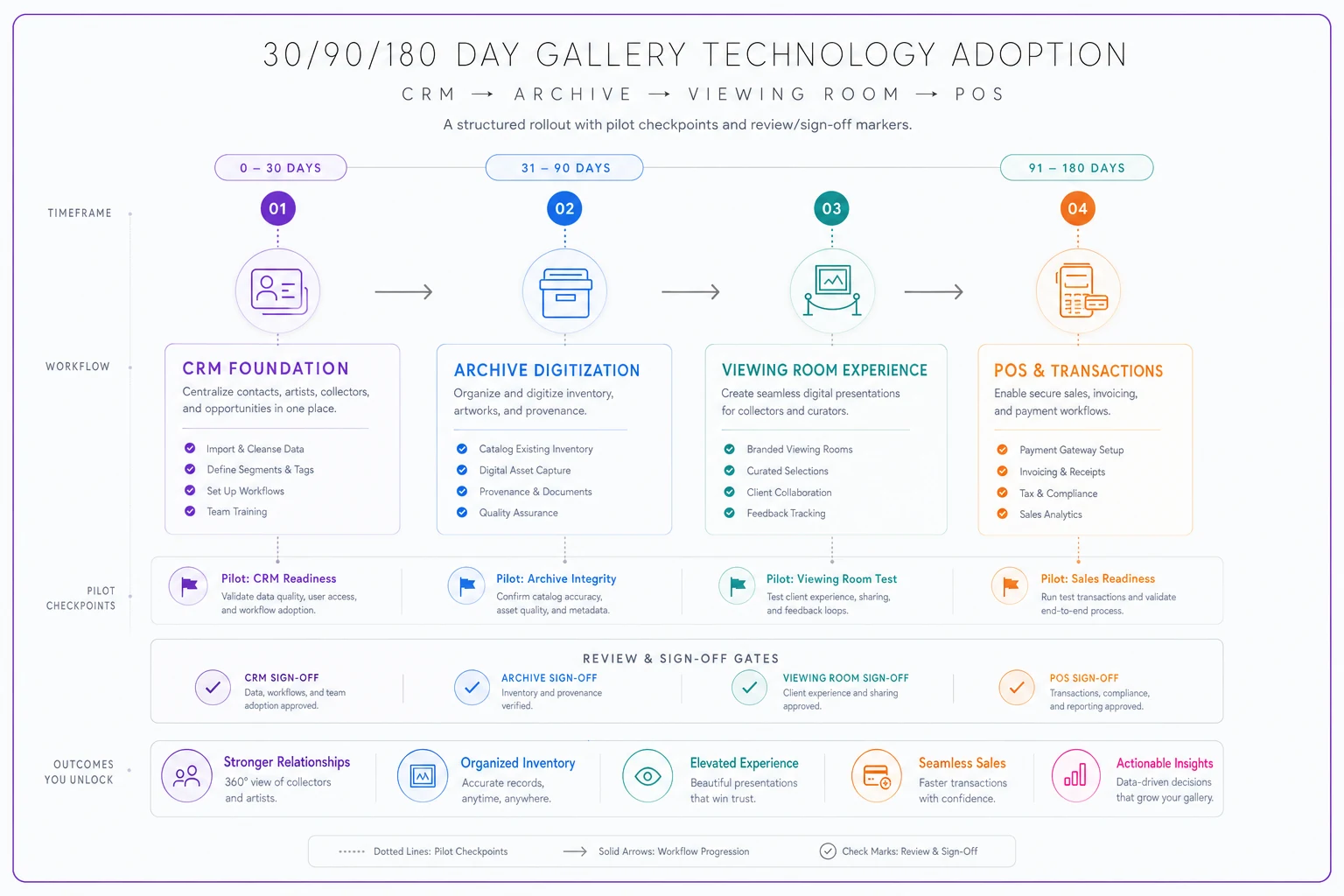
A simple visual of the pilot sequence helps teams keep the order straight.
Where AI-assisted tools quietly earn their place
None of the above requires AI to function. But once your data is clean and your systems are connected, a few operational chores stop being worth a human's time — and that's the honest place for automation, not before.
Deduplication and data cleanup during the CRM phase is one. Matching messy imported records, flagging likely duplicate collectors, and suggesting standardized fields is exactly the kind of pattern-matching work that AI-assisted operational software handles well — turning a two-week manual slog into a review-and-approve task.
Cataloging is another. Consistent titling, medium tagging, and status tracking across a growing archive is repetitive and error-prone by hand. Software that flags records missing required fields, or catches a work marked "available" in the viewing room but "sold" in the POS, removes an entire category of quiet mistakes — the kind you don't notice until a collector asks to buy something that's already gone.
The point isn't to automate your gallery. It's that a workflow-and-management platform with AI automation baked in can absorb the low-judgment, high-repetition tasks — sync checks, duplicate flags, missing-field alerts — so your three people spend their hours on relationships and curation instead of reconciling spreadsheets. That value only exists after the sequencing above is done. Automate a mess and you get a faster mess.
Governance and vendor handoff: the part everyone skips
This is where most rollouts quietly die. The system gets built — often by an outside consultant or the one tech-comfortable staffer — and then that person leaves, gets busy, or moves on. Nobody else knows how it works. Six months later you're back to spreadsheets.
Governance for a small gallery doesn't mean a policy binder. It means answering four questions in writing, one page each:
Vendor handoff checklist
-
Ownership
Who owns each system day to day? Not who bought it — who fixes it when it breaks and who trains the next hire.
-
Data standards
The object-record standard and the CRM field rules from the pilots. Living documents, updated when conventions change.
-
Access
Who can edit, who can only view, and what happens to access when someone leaves. Galleries are terrible at revoking access — a departed intern with edit rights is a real risk.
-
Vendor contacts
Support channels, contract renewal dates, and — critically — how to export your data if you ever leave the vendor. Assume you will someday.
When a consultant or vendor finishes setup, don't sign off until you have:
-
- [ ] A recorded walkthrough of every configured workflow (screen recording is fine — cheaper than another consulting day later)
-
- [ ] Admin credentials in the gallery's control, not the consultant's personal account
-
- [ ] The data standard documents, written down and stored where staff can find them
-
- [ ] A documented export path for every system's data
-
- [ ] At least two staff members who've completed a real task end to end, unassisted
-
- [ ] A named internal owner for each system
-
- [ ] A 30-day post-handoff check-in on the calendar
That last item matters more than it looks. Problems don't show up on handoff day. They show up three weeks later during a busy install, and you want the vendor still reachable when they do.
Role sign-offs for each phase
Sign-offs sound bureaucratic for a five-person gallery, but they do one useful thing: they force someone to actually confirm a phase works before you build the next one on top of it. Skipping this is how galleries end up with a viewing room built on data nobody verified.
| Phase | Who signs off | What they're confirming |
|---|---|---|
| 30-day (CRM) | Whoever owns collector relationships | Contacts are clean, segments make sense, team is logging interactions in one place |
| 90-day (Archive) | Registrar / person managing inventory | Object records meet the standard, CRM links resolve correctly |
| 180-day (Viewing Room + POS) | Director + whoever handles sales/finance | Full loop works, availability and pricing are accurate, POS reconciles against inventory |
Keep the sign-off itself dead simple — a dated note in your shared drive: "Phase confirmed working, here's what's still rough, here's who owns it." That's enough. The value is the pause, not the paperwork.
A real scenario
A two-person contemporary gallery — director plus a part-time registrar — decided to modernize after losing a sale because a work shown as available in an emailed PDF had actually sold three weeks earlier. Embarrassing, and it cost them a mid-four-figure commission and some trust with the collector.
Their instinct was to buy everything at once. Instead they ran the phased version. Thirty days on the CRM first: they cut a bloated contact list of roughly 2,400 down to around 600 that actually mattered, and killed the side spreadsheets. Then ninety days on the archive, cataloging about 130 active works against a one-page standard, each linked to its artist. Only after that did they turn on the viewing room and, last, the POS.
The whole thing took about seven months of light, consistent effort rather than one frantic month of chaos. The concrete outcome: no more "available" works that were already sold, because status now syncs from a single source. The registrar estimated she got back several hours a week previously lost to hunting down which record was current. Not a dramatic revenue explosion — just the quiet disappearance of a whole class of mistakes that had been costing them sales and credibility.
When this phased approach makes sense — and when it doesn't
It makes sense when you're running lean, your data is currently spread across spreadsheets and inboxes, and you can't afford a rollout that eats a whole quarter. The sequencing exists precisely to protect small teams from taking on too much at once.
It's overkill when you're genuinely tiny — under, say, 40 works and a handful of collectors — and a couple of well-organized spreadsheets already do the job. Don't build infrastructure for scale you don't have. The roadmap is for galleries feeling the strain, not for those still comfortable.
Who should NOT do this right now: anyone in the middle of a major install or a make-or-break show. Adoption needs slack in the calendar. Starting a CRM migration two weeks before a big opening guarantees you'll abandon it. Wait for a quiet stretch, then start with the 30-day phase and go from there.
The galleries that get this right aren't the ones with the biggest tech budgets. They're the ones that resisted the urge to fix everything at once, stabilized their data before connecting anything to it, and made sure someone actually owned each piece before moving on to the next. Sequence beats speed, every time.
Ready to elevate your gallery operations?
Join 500+ galleries using Artioly to streamline operations, boost visitor engagement, and increase art sales.