

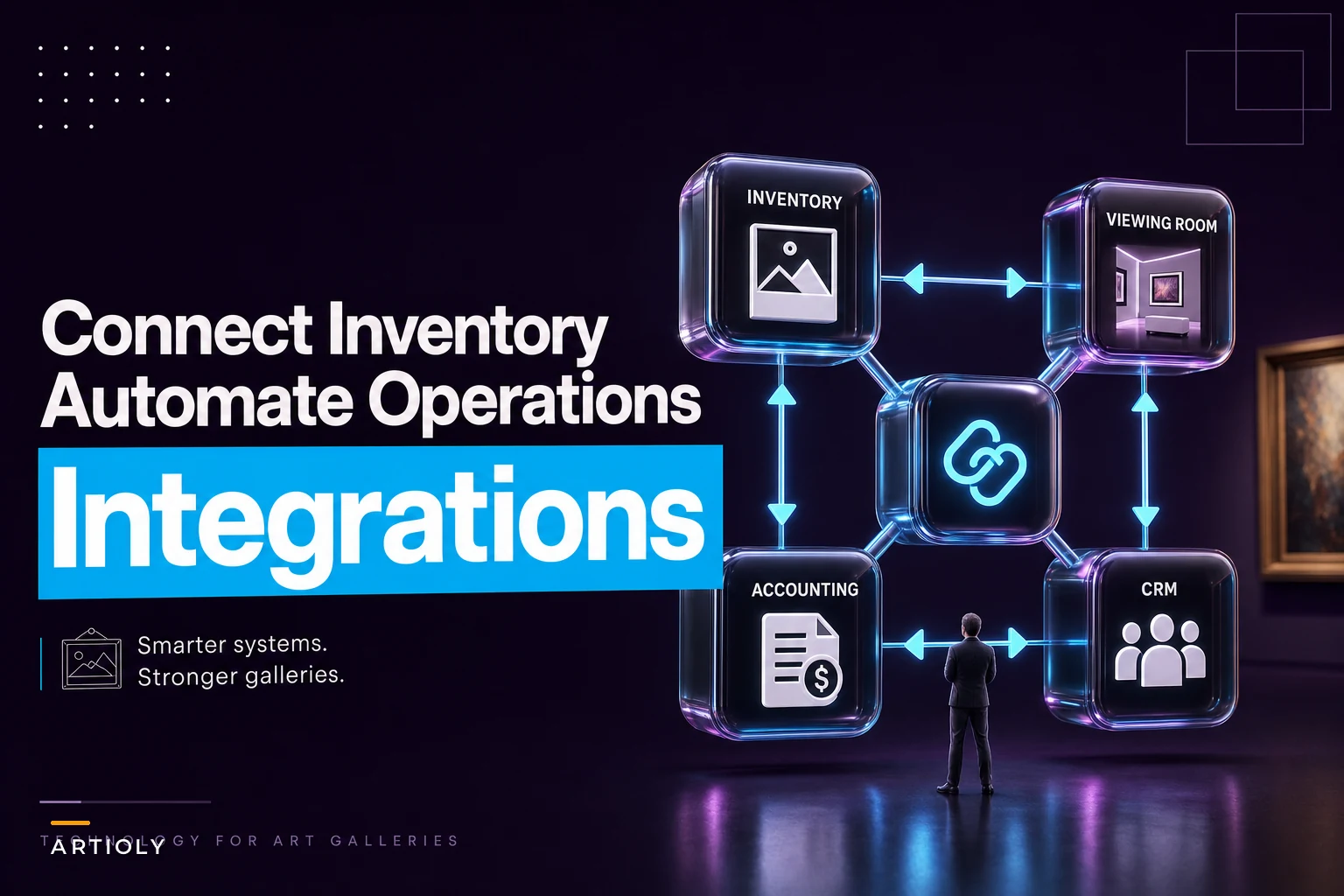

Most galleries don't have an inventory problem. They have a connection problem.
The works are catalogued. The CRM has contacts. The accountant gets a spreadsheet at month-end. But none of these things talk to each other, so your gallery manager is retyping the same sale into four systems — once in the inventory record, once in the invoice, once in the CRM note, once in the accounting ledger. Every manual retype is a place where status goes stale, a price gets fat-fingered, or a "sold" work still shows "available" on your viewing-room page three days after the wire cleared.
This piece is about the plumbing. Specifically: how to connect your art inventory software to the rest of your operational stack in a way a two-to-six person gallery can actually implement and maintain. No enterprise middleware fantasies. Just a prioritized connector list, field-mapping templates, three automations worth building first, and a six-week rollout that won't eat your program.
If you haven't locked down your underlying data model and photo standards yet, do that before integrating anything — connecting messy systems just spreads the mess faster.
Start with the integration map, not the tools
Before you touch a single connector, draw the map. On one sheet, list every system that currently holds artwork, money, or collector data. For a typical small gallery it looks something like this:
-
Inventory (your art inventory software — the source of truth for works)
-
Sales/invoicing (could be inside inventory, could be a separate tool)
-
Accounting (Xero, QuickBooks, or a bookkeeper's spreadsheet)
-
Viewing rooms / website (the public or private-link pages buyers see)
-
CRM (collector records, interest tags, offer history)
-
Automation layer (whatever you use to move data between the above)
Then draw arrows for where data actually flows today. In most galleries, the honest version of that diagram is a bunch of humans in the middle re-keying everything. The goal of integration isn't to connect everything to everything — it's to find the three or four arrows that cause the most pain and automate those first.
The common mistake is trying to sync bidirectionally everywhere. If inventory and the website both think they're the master of "price" and "status," you'll get conflicts that are genuinely hard to debug. Decide early: inventory is the master record for works and status. The CRM is the master for people. Accounting is the master for money once a sale is booked. Everything else reads from those.
The prioritized connector list
Not all connections are worth the same effort. Here's the order I'd build them in for a small commercial gallery, with the reasoning behind each.
| Priority | Connection | Why it's worth it | Difficulty |
|---|---|---|---|
| 1 | Inventory → Viewing room / website | Stops "sold but still showing available" errors in front of buyers | Low–Medium |
| 2 | Sale → Accounting | Kills duplicate invoice entry; cleans month-end | Medium |
| 3 | Inventory status ↔ CRM | Lets you see who was interested in a work that just sold | Medium |
| 4 | Viewing-room inquiry → CRM | Captures warm leads automatically instead of inbox archaeology | Low |
| 5 | Inventory → Loan / consignment tracking | Reduces "where is that work" panic | Medium–High |
| 6 | Sale → Artist statement / royalty ledger | Prevents payment disputes later | Medium |
The ranking isn't about technical elegance — it's about where the manual work and the embarrassing errors actually live. Connection #1 is first not because it's hardest but because a buyer seeing a sold piece listed as available makes you look careless in exactly the moment you want to look sharp.
One pattern worth calling out: galleries almost always want to start with the accounting integration because month-end is painful. But accounting is downstream of a clean sale record. If your sale data is messy at the source, syncing it into QuickBooks just gives you messy books faster. Fix the inventory-to-viewing-room loop first so your sale events are clean, then push them to accounting.
Field-mapping templates (the part everyone skips)
Integrations fail at the field level, not the system level. Two tools "connect" fine and then you discover one calls it priceretail and the other calls it listprice and a third stores price as a string with a dollar sign embedded in it. So before any connector goes live, write the mapping down.
Inventory → Viewing room
| Inventory field | Viewing-room field | Transform / rule |
|---|---|---|
inventory_id | internal_ref | Hidden, never public |
title | title | Direct |
artist_name | artist | Direct |
status | availability | available→show; on hold/reserved→"inquire"; sold→hide or mark sold |
price_retail | display_price | Respect "price on request" flag |
primary_image | hero_image | Use sale-ready master, not thumbnail |
dimensions | specs | Format consistently (cm vs in) |
Sale → Accounting
| Sale field | Accounting field | Rule |
|---|---|---|
sale_id | invoice_reference | One-to-one |
buyer | customer | Match to existing or create |
sale_price | line_amount | Net of tax, tax as separate line |
commission_split | artist_payable | Books the liability at sale, not at payout |
sale_date | invoice_date | Drives revenue recognition |
payment_status | invoice_status | deposit→part-paid; cleared→paid |
Inquiry → CRM
| Viewing-room field | CRM field | Rule |
|---|---|---|
work_viewed | interest_tag | Tag contact with artist + work |
inquiry_message | note | Timestamped |
email | contact_match | Dedupe before creating |
source | lead_source | "viewing room" for attribution |
Book the artist liability at the moment of sale to avoid overstated gross margin during the period before payout.
The single biggest field-level gotcha is the commission split. If accounting only books the artist payable when you cut the cheque, your books overstate gross margin for weeks and you lose track of what you owe. Book the artist liability at the moment of sale. This ties directly into how you structure splits in the first place — worth reviewing your commercial governance for pricing, commissions and editions so the numbers flowing into these fields are already clean.
Three automations worth building first
Skip the clever stuff. These three remove the most retyping and carry the most risk if left manual.
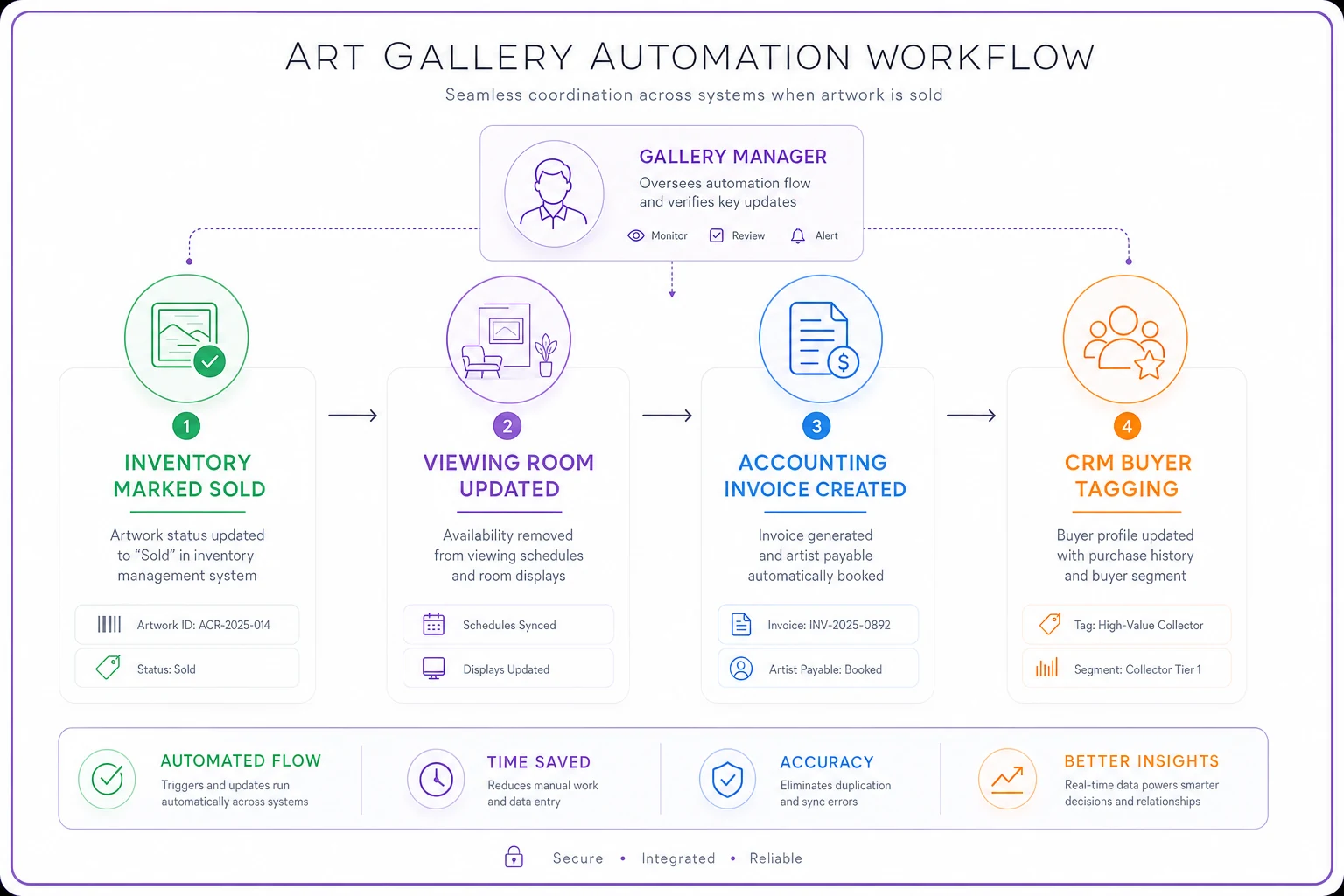
A compact diagram of the workflow clarifies the arrows before you build.
1. Sale reconciliation
-
Gallery manager marks the work
soldin inventory and records sale price + buyer. -
Automation hides the work from the viewing room (or flips it to "sold").
-
A draft invoice is created in accounting with the sale price, tax line, and the artist payable as a booked liability.
-
The buyer's CRM record gets a purchase event and is retagged from "prospect" to "collector of [artist]."
-
Anyone in the CRM tagged as previously interested in that work gets flagged for a "similar work" follow-up — not auto-emailed, just surfaced for a human to decide.
Step 5 is the quiet money-maker. When a work sells, there are usually a few people who were seriously interested and never followed through. Surfacing them automatically turns one sale into a warm follow-up list instead of a forgotten opportunity.
2. Viewing-room fulfilment
-
You build a viewing room for a collector — a curated set of works pulled live from inventory.
-
Because it reads inventory status in real time, if one of those works sells elsewhere, it drops or marks sold automatically. No awkward "oh, that one's actually gone" email.
-
When the collector inquires on a specific work, that inquiry lands in the CRM tagged to the work and the person, and pings the right salesperson directly.
-
If the work is placed on hold from that inquiry, inventory status flips to
reservedand the viewing room reflects it.
This is the integration that makes a viewing room feel like a finished sales tool instead of a PDF with extra steps. The discovery-to-fulfilment logic behind it is worth building deliberately — it's harder to retrofit later. If you want to think through the broader programming approach, the operational omnichannel programming strategy for small commercial galleries covers the strategic side well.
3. Loan and consignment tracking
-
When a work's status changes to
on loanorout on consignment, the automation records the counterparty, location, and expected return date. -
A reminder fires to the responsible staff member a set number of days before the return date.
-
If the work is sold while on consignment, the sale reconciliation automation still fires, but with the consignment terms applied to the split.
-
An always-current "works not in the building" view updates so you can see your off-site exposure at a glance.
The failure this prevents is specific and expensive: a work goes out on approval, the collector goes quiet, the return date passes, and nobody notices until the artist asks where their piece is. A dated reminder tied to the status change removes the "we forgot" category of problem entirely.
The six-week rollout timeline
Trying to connect everything in one weekend is how galleries end up with a half-wired system nobody trusts. Stage it.
Week 1 — Map and decide masters. Draw the integration map. Lock down which system is master for works, people, and money. Clean up your most-used fields so names and formats are consistent. Nothing gets connected yet.
Week 2 — Inventory → viewing room. Build and test connection #1. Deliberately sell a test work and confirm it drops from the viewing room. This is your confidence-builder.
Week 3 — Sale → accounting. Set up the sale-to-invoice sync with the commission split booked correctly. Run three past sales through it and have your bookkeeper confirm the books look right.
Week 4 — CRM connections. Wire inquiry capture and the sale-to-collector retagging. Check deduplication is working so you don't create "John Smith" four times.
Week 5 — Automations. Turn on sale reconciliation and the underbidder surfacing. Add loan/consignment tracking if you move works off-site regularly.
Week 6 — Stress test and document. Run a full cycle end-to-end: inquiry → hold → sale → invoice → artist liability → collector retag. Write a one-page SOP for each flow so it survives staff turnover.
The reason this is six weeks and not two is that each stage needs to run against real transactions before you trust it. An integration that works on test data and breaks on a part-payment deposit is worse than no integration, because people stop checking.
Who does what: a simple role matrix
Integrations drift when nobody owns them. Even in a tiny team, assign these roles — one person can hold several.
| Role | Responsibility |
|---|---|
| Data owner (inventory) | Keeps work records and statuses accurate; final say on inventory fields |
| CRM owner | Owns contact quality, dedupe, tagging conventions |
| Finance liaison | Confirms sale-to-accounting mappings and month-end reconciliation |
| Integration maintainer | Watches for broken syncs, owns the SOPs, handles vendor issues |
| Approver | Signs off before any new automation goes live |
The role that gets forgotten is the integration maintainer. Connectors break — an API key expires, a vendor renames a field, a plan downgrade kills a feature. Someone has to notice. If you're thinking about how roles stretch as you grow, the capacity-planning side of this is covered in avoid scaling chaos with gallery roles and capacity planning.
A small but important point: in a two-person gallery, the integration maintainer is probably the same person who owns inventory. That's fine. What's not fine is having no one own it at all, which is how you end up with broken syncs that run silently for weeks before anyone notices the damage.
Integration patterns: API, native connector, or middleware?
You'll hit three ways to connect systems. Knowing which to reach for saves a lot of wasted effort.
-
Native connector — The two tools have a built-in integration (e.g., your inventory tool has a QuickBooks button). Always your first choice when it exists. Least maintenance, vendor-supported, breaks least.
-
Middleware (Zapier, Make, n8n) — A no-code service that moves data between tools that don't natively connect. Great for small galleries. Fast to build, easy to adjust, cheap at low volume. Watch the per-task pricing as volume grows.
-
Direct API — Custom code against each tool's API. Most flexible, most powerful, but needs a developer and ongoing maintenance. Only worth it when native and middleware genuinely can't do the job.
A sensible default for a small gallery: native connectors where they exist, middleware for everything else, and direct API only as a last resort. The galleries that get into trouble are the ones that jump straight to custom API work for a problem Zapier could have solved in an afternoon — then can't maintain it when the person who built it leaves.
Cost and risk checklist
Run through this before committing to any integration plan.
-
Per-task / per-operation costs — Middleware bills by volume. Estimate your monthly sale + inquiry events and check it against the pricing tier.
-
Who owns the credentials — If one person's personal account holds all the API keys, you have a single point of failure. Use shared/service accounts.
-
Data duplication risk — Every sync is a chance to create duplicate contacts or double-booked invoices. Confirm dedupe rules exist.
-
Partial-payment handling — Deposits, instalments, and part-paid works break naive integrations. Test these explicitly.
-
Field change fragility — If a vendor renames a field, what breaks? Document the mappings so you can repair fast.
-
Rollback plan — If an automation misfires and books 40 wrong invoices, how do you undo it? Know this before going live.
-
Vendor lock-in — Can you export your data if you leave the platform? Check before you build everything around it.
This list isn't exhaustive, but it covers the failure modes that actually show up in small gallery contexts. Partial-payment handling in particular gets skipped constantly, and it's usually the first thing that breaks.
A realistic example
A two-person contemporary gallery was running inventory in one tool, invoicing by hand in their accounting software, and tracking collectors in a spreadsheet. Every sale meant updating the work's status, writing an invoice, noting the buyer, and remembering to pull the piece from their online viewing room. Four steps, done by one tired person, usually late.
The failure points were predictable. A couple of times a quarter, a sold work stayed live online. Artist payables got booked whenever someone got around to it, so their margin always looked better than it was until payout hit. Underbidders — the people who'd asked about a work that then sold — just evaporated.
They staged in the first three connectors over about a month: inventory to viewing room, sale to accounting with the split booked at sale, and inquiry capture into a proper CRM. The marking-sold step now updated everything in one action. Month-end reconciliation dropped from the better part of a day to roughly an hour, mostly spot-checking. And the underbidder surfacing turned into two additional placements over the following season that would almost certainly have slipped away before.
Nothing dramatic. No reinvention of the gallery. Just the retyping gone and the stale-status errors fixed — which is exactly what good integration should feel like.
When this is worth it — and when it isn't
Worth it when: you're doing enough transactions that manual retyping is a real time cost, you're running viewing rooms, or your month-end reconciliation is consistently painful. If sold works keep showing as available, or you've ever lost track of a consigned piece, start now.
Not worth it yet when: you're doing a handful of sales a year and a clean spreadsheet genuinely covers it. Integration is maintenance overhead. If there's barely any volume to automate, you're building plumbing for water that isn't flowing.
Who should hold off: galleries whose underlying inventory data is still a mess. Connecting dirty data just distributes the dirt. Clean the source first — consistent field names, accurate statuses, real sale-ready images — then integrate.
The thread running through all of this: integration is only as good as the discipline behind it. A clear master-record decision, written field mappings, and one person who owns the connections will outperform the most expensive setup run by nobody in particular. Wire the painful arrows first, document as you go, and let the system do the retyping your staff shouldn't have to.