



Most small galleries have a digitisation "plan" that lives somewhere between a wishful spreadsheet and a hard drive in the back office. There's a stack of works that should be photographed properly. There's a vague intention to fix the metadata "when things slow down." And there's usually one panicked moment — a licensing request, an insurance claim, a loan out the door — where someone realises the digital record for a piece is either missing, wrong, or scattered across three systems.
The problem isn't laziness. Digitisation gets treated as a one-time project instead of a pipeline. A pipeline has ordering, rules, and handoffs. Without those, you don't get a collection archive — you get a graveyard of half-tagged JPEGs nobody trusts enough to actually use.
This piece is about building a collections digital strategy that a two-to-six person gallery can actually run: how to decide what gets digitised first, what "good enough" looks like for files and metadata, how storage rules change over time, and — the part almost everyone skips — how rights and access get baked in so the whole thing eventually pays for itself through licensing and research revenue.
Start with the uncomfortable truth: you can't digitise it all
Here's the pattern that kills most gallery digitisation efforts. Someone decides the goal is "digitise the collection," full stop. Six weeks in, they've photographed 40 works to museum-grade standards, burned through a volunteer's patience, and haven't touched the pieces that actually generate requests. Momentum dies. The drive gathers dust.
The galleries that succeed do the opposite. They accept from day one that digitisation is a prioritisation problem, not a completeness problem. You're allocating scarce hours and storage against a collection where maybe 15% of the works will ever get a licensing inquiry, a loan request, or a serious research question.
So the first real decision is scoring. Which works earn a spot at the front of the queue?
A simple scoring model that actually gets used
Forget elaborate rubrics. What works in practice is a lightweight score across a handful of dimensions, weighted toward things that create revenue or risk if you don't have a clean digital record.
| Factor | Why it matters | Weight |
|---|---|---|
| Licensing / commercial demand | Works people ask to reproduce pay you back directly | High |
| Loan & exhibition frequency | Frequently loaned works need condition + image records ready | High |
| Fragility / conservation risk | If it degrades, the digital record may be all that survives | Medium |
| Provenance / research value | Scholars and buyers ask for these; documentation closes sales | Medium |
| Sale readiness | Works likely to sell need images and metadata now, not later | Medium |
| Insurance exposure | High-value pieces need airtight records for claims | Low–Medium |
Score each work 1–3 on each factor, multiply by weight, and sort. You don't need software for the first pass — a spreadsheet and an afternoon will surface your top 50 to 100 works. Those become your Phase 1 queue.
The insight most galleries miss: the highest-value works to digitise are rarely the most expensive ones. A moderately priced print that gets three licensing requests a year is worth more in your pipeline than a six-figure painting nobody reproduces. Score for activity, not just value.
Set minimum standards before you photograph a single frame
The second failure point is inconsistency. One volunteer shoots at 2000px, another at 6000px. One person names files by artist, another by accession number, a third by "finalv2REAL.jpg." Three years later you have 4,000 files and no reliable way to find, trust, or license any of them.
Never miss a key exhibition detail again.
Artioly helps you organize, promote, and manage every exhibition effortlessly.
- Unified exhibition scheduling
- Artist and visitor notifications
- Inventory and sales tracking
No credit card required
Standards fix this, but only if they're minimums — deliberately modest so people can actually meet them. The goal isn't perfection. It's consistency that scales.
File standards worth committing to
-
Capture format Shoot RAW where possible, but always archive a high-resolution TIFF (uncompressed) as your master. This is your preservation file.
-
Access derivatives Generate a high-res JPEG for licensing and a web-sized JPEG for the website and CRM from the master. Never edit the master directly.
-
Resolution floor Aim for a master long edge of at least 4000px. For 2D works, that covers most reproduction requests without a reshoot.
-
Colour Include a colour reference in at least one frame per work so you can correct accurately later.
-
One naming convention, forever
[accession][artist-surname][view].tif. Boring, unambiguous, sortable. Pick it and never deviate.
If you're building or refining the actual capture side of this, the mechanics of lighting, backdrops, and batch importing deserve their own attention — there's a full breakdown in this low-cost capture kit and batch-import checklist that pairs well with the standards here.
Metadata: the part that decides whether any of this is usable
-
Accession / inventory number (the anchor that ties everything together)
-
Artist name and life dates
-
Title, date, medium, dimensions
-
Current owner / consignor status
-
Copyright holder (frequently not the gallery — this trips people up constantly)
-
Rights status
cleared for licensing / restricted / unknown
-
Provenance summary
-
Condition note + date of last condition check
-
File version and capture date
That sixth field — rights status — is where the money and the lawsuits live. More on that below.
Storage rules that change as you grow
A single hard drive is fine when you have 80 files. It is a disaster waiting to happen when you have 8,000. Storage strategy has to evolve, and the transition points are pretty predictable.
Think of storage in two tracks that behave differently:
Short-term / working storage is for files in active use — recent shoots, images being sent to a client, works in an upcoming exhibition. This lives somewhere fast and accessible, syncs across your team, and gets cleaned out regularly. The mistake here is letting working storage become your archive by default. It's not built for that.
Long-term / preservation storage is for master files you cannot afford to lose. The old museum rule still holds up: keep three copies, on two different types of media, with one copy off-site. In practice for a small gallery that means the master on a primary drive, a synced cloud copy, and a periodic backup to a separate physical drive stored somewhere else. Verify the backups actually restore — an untested backup isn't a backup, it's a hope.
The migration timeline nobody plans for
Galleries hit storage crises at roughly three moments:
-
Around 500–1,000 master files the single-drive setup starts feeling risky. This is when to formalise the 3-2-1 rule.
-
Around 3,000–5,000 files finding anything becomes painful, and someone finally admits the folder structure has failed. This forces a move toward a real catalogue system where metadata, not folders, drives retrieval.
-
When licensing volume picks up you suddenly need to serve access copies to outside parties without exposing masters, which means access-tier storage becomes its own thing.
Plan for these before you hit them. Retrofitting standards onto 4,000 badly named files costs ten times what it costs to do it right from file one.
Rights management: the layer that turns an archive into an asset
This is where most collections digital strategy work quietly falls apart, because it's the least fun part and the easiest to defer.
A digital image of an artwork carries at least two overlapping rights layers: the copyright in the artwork itself (usually the artist's or their estate's, often for decades after) and any rights in the photograph you commissioned. Owning a physical piece does not mean you can license its image freely. Galleries get this wrong constantly, and the consequence isn't abstract — it's a cease-and-desist, a clawed-back fee, or a burned artist relationship.
So the rights policy has to be a field in your system, not a memory in someone's head. For every digitised work, you need a defensible answer to:
-
Who holds copyright in the work?
-
Do we have written permission to reproduce and license it?
-
What's the scope of that permission — editorial only, commercial, print, digital, territory, duration?
-
What's the revenue split with the artist or estate?
-
Are there any moral-rights or attribution requirements attached?
The galleries that handle this well treat rights clearance as part of the digitisation pipeline itself. A work isn't "done" when it's photographed and tagged — it's done when its rights status is resolved and recorded. That means when a licensing request lands, you're not scrambling; you already know whether you can say yes and on what terms. The full workflow for fees, clauses, and approvals is worth studying in depth in this guide to capturing image licensing revenue safely, which slots directly into the rights layer described here.
Tying access to revenue
Once rights are clean, access becomes something you can actually control and monetise. Not everyone gets the master file. A tiered approach works:
-
Public / web tier low-res, watermarked, for the website and social. Free, drives interest.
-
Research tier medium-res for scholars, sometimes gated behind a request form so you know who's using what. Often free but tracked.
-
Commercial / licensing tier high-res access copies released only after a signed licence and payment. This is your revenue line.
The key thing to internalise: the digital archive earns money not by existing, but by having clear rights and controlled access wired together. An image nobody can license is a cost. An image with resolved rights and a clean access tier is inventory.
Below is a visual of the digitisation and rights-clearance workflow.
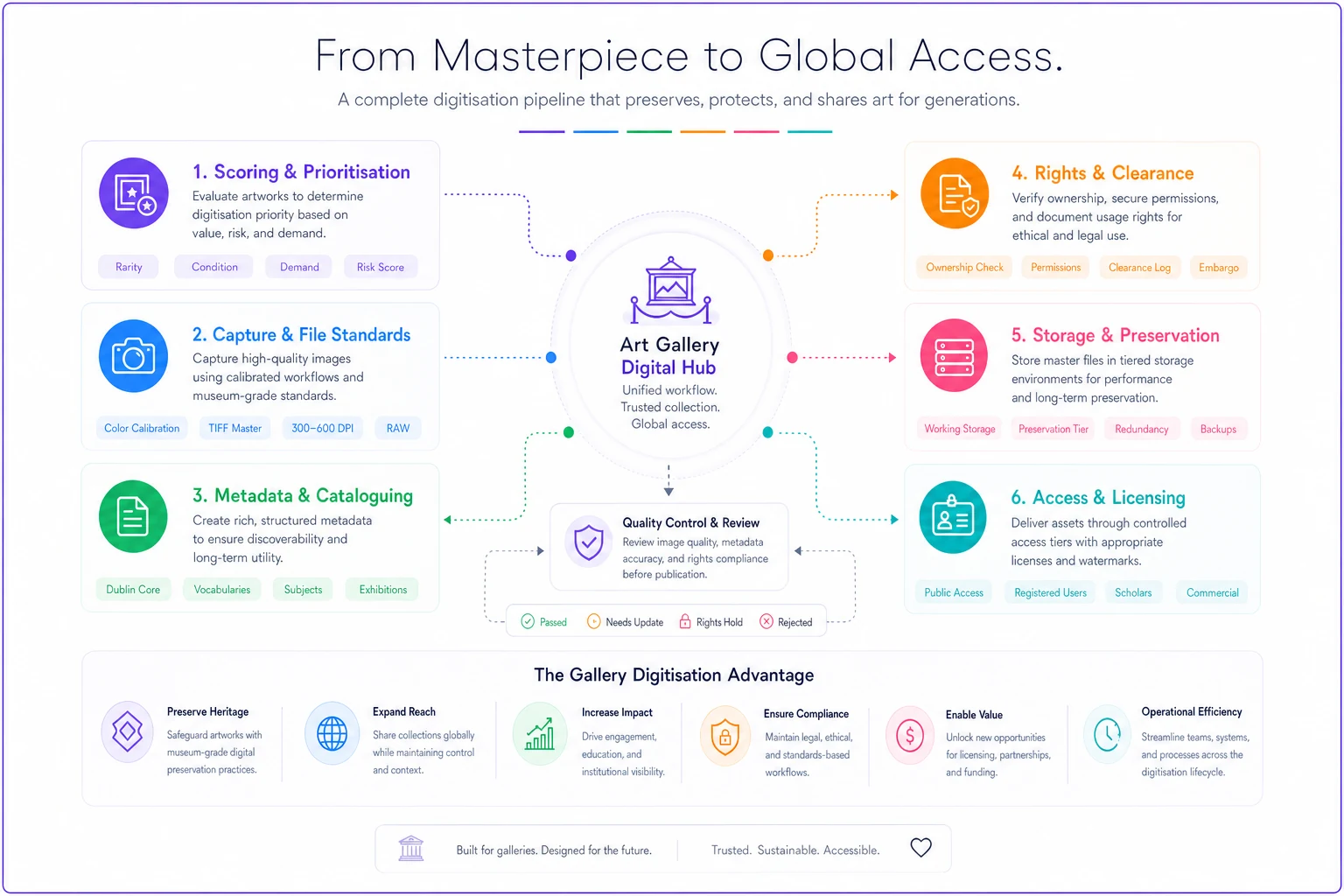
When rights are recorded and access levels are enforced the pipeline stops being a liability and becomes the mechanism that turns images into licenceable inventory.
A real scenario
A small contemporary gallery — four-person operation, roughly 600 works across owned pieces and long-standing consignments — had "digitised" for years in the loosest sense. Files everywhere, no naming standard, rights status recorded nowhere.
They were getting occasional licensing requests, maybe a handful a year. Each one turned into a two-week fire drill: find the file, hope it was high enough resolution, chase the artist to confirm they could even license it, negotiate a fee from scratch. Half the requests fell through because the reproduction-quality image didn't exist, or nobody could confirm rights in time. A few missed licences a year, each in the low hundreds — plus the goodwill cost of looking disorganised to a publisher.
They spent about a quarter rebuilding around a scored queue. The top 120 works by licensing and loan activity got photographed to a fixed standard, tagged with the minimum metadata set, and — critically — had rights status resolved and recorded. Storage moved to a proper 3-2-1 setup with a separate access tier.
The change wasn't dramatic on paper, but it was real. Licensing requests started closing in a day or two instead of dying in a two-week scramble. They converted requests they'd previously have lost, and because the terms were pre-thought-out, fees stopped being guesswork. Within about a year, licensing shifted from an occasional nuisance into a small but genuinely predictable revenue line — and, just as valuable, loan and insurance paperwork stopped being an emergency every single time.
When this is worth it — and when it isn't
When a serious pipeline makes sense:
-
You get any recurring licensing or reproduction requests, even a few a year.
-
You loan works out regularly and need image + condition records ready.
-
You hold works by artists with active estates where rights questions are inevitable.
-
You're carrying enough inventory that "just remember where it is" has already failed once.
When to keep it lightweight:
-
A very small, stable collection with almost no external image demand. Photograph the important pieces to a decent standard, back them up sensibly, and don't over-engineer.
-
Works where you clearly don't hold or can't obtain licensing rights — document them for insurance and internal use, but don't invest in a commercial access tier that can never be used.
Who should not chase the full build: a gallery that hasn't yet nailed the basics of inventory tracking. Digitisation sits on top of a working collection record. If your accession numbers are chaos, fix that first — otherwise you're just adding high-resolution confusion.
Where software quietly earns its place
None of this requires a big platform to start — a spreadsheet, a camera, and discipline get you surprisingly far. But there's a point, usually somewhere past a few thousand files and a steady trickle of requests, where the manual version starts leaking value. Files get orphaned from their metadata. Rights status lives in one person's head. A licensing request comes in and the answer depends on who's in that day.
This is where an operational platform with some AI automation genuinely helps — not as a gimmick, but by holding the pipeline together. The practical wins are unglamorous: automatically generating access derivatives from a master so nobody edits the wrong file, flagging works whose rights status is still "unknown" before they end up in a licensing offer, keeping metadata attached to files so retrieval doesn't depend on folder archaeology, and surfacing which high-demand works still haven't been digitised. The point isn't to replace judgement about rights or quality — it's to make sure the record stays consistent, connected, and findable as the collection scales past what any one person can track.
The bigger picture
A collections digital strategy fails when it's framed as "we need to scan everything." It works when it's framed as a pipeline: priorities set upfront, standards that don't shift depending on who's holding the camera that day, storage rules that grow with the collection, and rights and access wired in from the start.
Get those pieces connected and the archive stops being a cost centre gathering dust on a drive. It becomes something that protects you during loans and claims, closes sales with buyers who want documentation, and eventually pays part of its own way through licensing. The galleries that get this right didn't do it by digitising faster. They did it by digitising in order, with rules attached, and by refusing to call a work "done" until anyone on the team could answer: what is it, who owns the rights, and can we license it. Start there, and the rest of the pipeline has something solid to build on.
Get those pieces connected and the archive stops being a cost centre gathering dust on a drive. It becomes something that protects you during loans and claims, closes sales with buyers who want documentation, and eventually pays part of its own way through licensing. The galleries that get this right didn't do it by digitising faster. They did it by digitising in order, with rules attached, and by refusing to call a work "done" until anyone on the team could answer: what is it, who owns the rights, and can we license it. Start there, and the rest of the pipeline has something solid to build on.
Ready to elevate your gallery operations?
Join 500+ galleries using Artioly to streamline operations, boost visitor engagement, and increase art sales.