

Most small galleries don't fail at inventory because they picked the wrong tool. They fail because nobody agreed on what a record should look like before anyone started typing. One person writes "Untitled (2019)," another writes "Untitled, 2019, oil," and six months later you genuinely can't tell if those are the same painting or two different ones. The software is fine. The data going into it is a mess.
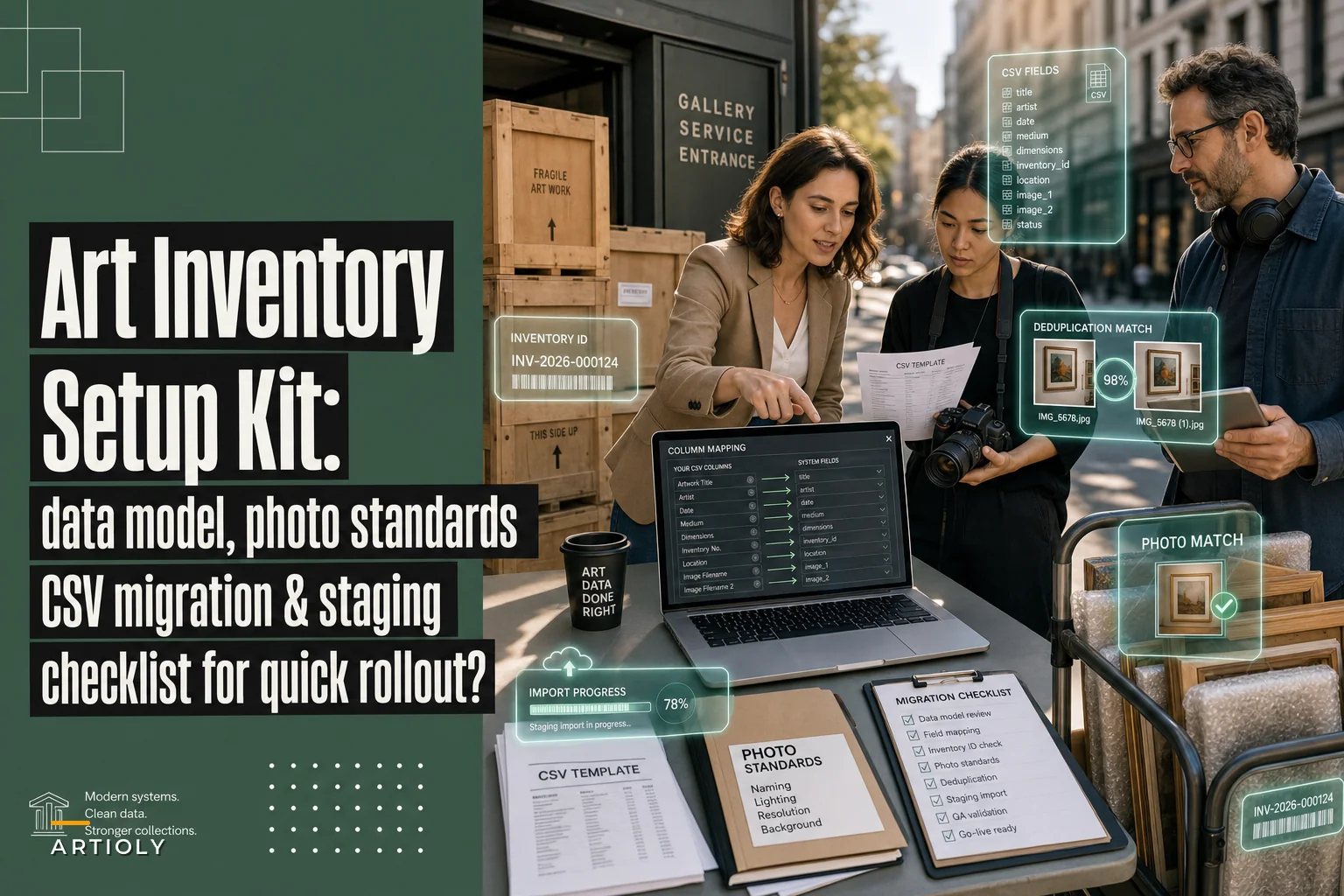
This is a setup kit, not a pep talk. By the end you'll have a data model you can paste into a spreadsheet today, a file-naming standard your whole team can follow, a tagging system that actually helps you find work and close sales, a condition-report template, a role matrix so updates don't rot, and a migration checklist for pulling your old spreadsheets in without creating duplicates. Whatever art inventory software you land on — a dedicated platform or a well-structured Google Sheet — this foundation travels with you.
Start with the record, not the software
The single most useful thing you can do before touching any platform is decide what one artwork record contains and lock it down. Every gallery with clean inventory did this first. Every gallery drowning in duplicates skipped it.
The trap is thinking the software's default fields are your data model. They aren't. Vendor defaults are designed to look impressive in a demo, not to match how your gallery tracks consignment splits or edition numbers. If you import your legacy data into someone else's field structure without deciding your own first, you inherit their assumptions and lose yours.
So here's the minimum viable record — the fields that, in real operations, cause the most pain when they're missing or inconsistent.
Required metadata fields (the non-negotiables)
| Field | Format / rule | Why it matters |
|---|---|---|
inventory_id | Unique, never reused (e.g. GAL-2024-0137) | Your single source of truth. Everything links to this. |
artistnamelast / artistnamefirst | Split into two fields | Lets you sort and dedupe; "Smith, Jane" vs "Jane Smith" breaks otherwise |
title | Exact, including "Untitled" | Matching titles across records is how you catch dupes |
year | 4-digit, or range 1998–1999 | Avoid "c. 90s" in the data field — note it elsewhere |
medium | Controlled list (see tagging) | Free-text medium is the #1 source of inconsistency |
dimensionshcm / wcm / dcm | Numbers only, one unit | Store cm as the master; display inches if you want |
edition | 3/10 or unique or AP 1/2 | Blank editions cause duplicate-sale disasters |
status | Controlled: available, on hold, consigned out, sold, NFS, archived | Drives everything downstream |
owner_type | gallery-owned or consigned | Determines payment and rights handling |
consignor | Name + agreement ID | Links back to the paperwork |
price_retail | Number, currency field separate | Keep price history; don't overwrite |
location_current | Main floor, Storage B-3, On loan – [venue] | The field people forget to update, every time |
acquisition_date | ISO YYYY-MM-DD | Makes aging and reporting trivial |
provenance_notes | Free text, append-only | Never overwrite — only add |
condition_summary | Short, links to full report | One-line flag: stable, see report 0137 |
A copy-ready CSV header row:
``
inventoryid,artistnamelast,artistnamefirst,title,year,medium,dimensionshcm,dimensionswcm,dimensionsdcm,edition,status,ownertype,consignor,priceretail,currency,locationcurrent,acquisitiondate,provenancenotes,conditionsummary,primaryimage,tags
``
One rule that saves more grief than any other: dates in ISO format, dimensions in one unit, and inventory_id never, ever reused. When a work is deaccessioned or returned, set its status to archived. Don't recycle the ID for the next piece. Reused IDs are how two completely different paintings end up sharing a sales history.
File naming: boring, and the thing that breaks everything
A pattern that comes up constantly — a gallery has beautiful photography, carefully shot, and the files are named IMG4471.jpg, finalv2.jpg, untitled-FINAL-use-this-one.jpg. Nobody can connect an image to a record without opening each one. When someone needs a hi-res for a collector or press request, they spend twenty minutes hunting.
Your file name should identify the work without you ever opening the file. The simplest reliable convention:
``
INVENTORYIDartistlastshorttitleviewresolution.jpg
``
Real examples:
``
GAL-2024-0137okaforrivermouthfronthires.jpg
GAL-2024-0137okaforrivermouthdetail01hires.jpg
GAL-2024-0137okaforrivermouthversoweb.jpg
``
A few standards worth enforcing from day one:
-
Lead with the
inventory_id. It's the thread that ties the image to the record no matter where the file ends up. -
Lowercase, no spaces, hyphens or underscores only. Spaces and capital letters break on servers, in URLs, and in bulk imports.
-
Use
viewtags consistentlyfront,verso,detail01,detail02,installed,framed,signature. -
Flag resolution in the name
hiresfor print/press,webfor the site and viewing rooms. This stops someone emailing a 40MB TIFF to a collector or posting a thumbnail to the shop. -
One primary image per record, referenced in the
primary_imagefield. Everything else is secondary.
Lead with the
inventoryidin filenames so bulk imports can match on theinventoryidprefix without manual work.
The payoff isn't aesthetic. When file names are machine-readable, bulk importing photos into any art inventory software becomes a matter of matching on the inventory_id prefix rather than dragging files one at a time. A batch that takes a full afternoon manually drops to a few minutes.
A tagging taxonomy built for finding and selling, not just filing
Tags are where most systems quietly fall apart. Someone tags a work landscape, someone else landscapes, a third person nature. A search for any one of them misses the others. The fix is a controlled vocabulary — a short, fixed list of allowed tags organized by purpose.
Split your tags into clear categories so they stay useful instead of turning into a word cloud:
Medium / technique (controlled list — pick one primary):
painting-oil, painting-acrylic, works-on-paper, photography, sculpture, mixed-media, print-edition, textile, video, installation
Subject / genre (for discovery, collector browsing):
abstract, figurative, landscape, portrait, still-life, conceptual, text-based
Sales / operational (this is the money category):
price-under-5k, price-5-15k, price-15k-plus, fair-ready, large-format, small-format, framed, unframed, requires-crating
Programming / relationship:
current-show, past-show-[year], artist-primary, artist-estate, commission
The operational tags matter more than people expect. When a collector says "something under ten thousand I can hang in a dining room," you want to filter price-under-5k + figurative + small-format in three clicks — not scroll a 400-row sheet from memory. Those same tags feed directly into how you present work online; if you've built out a viewing-room and omnichannel approach, consistent tags are what let the same record flow from inventory to a curated online selection without re-entering anything.
One mistake worth calling out: don't tag everything. A record with twenty tags is as useless as one with none. Aim for one medium tag, one or two subject tags, the relevant sales tags, and current programming status. If a tag doesn't help you find or sell the work, cut it.
The condition report template
Condition reports get written when a work arrives and when it leaves — and the gap between a good one and a bad one is whether you can actually prove something was already damaged before it was in your care. A reusable template means nobody has to remember what to check.
Condition report — copy-ready structure:
-
Report ID & date
COND-0137-2024-06-14 -
Inventory ID links to the master record
-
Examined by name + role
-
Context
incoming,outgoing,pre-exhibition,post-loan,annual -
Overall rating
excellent/good/fair/fragile/unstable -
Support/substrate canvas, paper, panel, etc. — observed state
-
Surface craquelure, scratches, abrasions, accretions — with location
-
Frame / mount condition, glazing type, hanging hardware
-
Existing damage map reference photo file names (
...detail01hires.jpg) with location notes -
Handling notes
two-person lift,no direct contact,keep vertical -
Signature line + date
The detail that trips galleries up most: the condition report needs to reference the image file names that document any flaw. A note saying "small scuff lower left" is weak. "Small scuff lower left, see GAL-2024-0137okaforrivermouthdetail02hires.jpg" is evidence. For fragile and mixed-media pieces this becomes essential, since those are usually the works most likely to generate a dispute.
Who updates what: the role / SOP matrix
A data model doesn't stay clean on its own. It rots when everyone can edit everything and nobody owns accuracy. The failure mode looks like this: a sale closes on Friday, three people assume someone else updated the status, and the piece sits as available all weekend while it shows in two online viewing rooms. Then a second collector asks to buy it.
Assign ownership explicitly. A lightweight matrix:
| Action | Who owns it | When |
|---|---|---|
| Create new record | Registrar / inventory lead | On intake, same day |
| Upload + rename images | Whoever shoots, or studio assistant | Before record goes live |
Set/change status | Sales lead | Immediately on hold/sale |
Update location_current | Whoever physically moves the work | At the moment of the move |
| Price changes | Director / owner | Logged, never overwritten |
| Condition reports | Registrar | On every in/out event |
| Monthly dedupe + QA pass | Inventory lead | Last business day of month |
Copy-ready SOP snippet — status change on sale:
> When a work is reserved or sold, the sales lead updates status in the inventory record before leaving for the day. A hold is on hold with a 72-hour expiry noted in provenance_notes. A confirmed sale is sold with date. No work is removed from online viewing rooms until the record reflects the new status. If the sales lead is unavailable, the director completes the update.
The "before leaving for the day" clause is doing real work there. Vague SOPs ("update promptly") get ignored; time-bound ones get followed. As the team grows, this is also where inventory accuracy ties into broader roles and capacity planning — the matrix only holds if each role actually has the bandwidth to own its piece.
This is also where good art inventory software earns its keep: syncing a status change across your site and viewing rooms the moment it's entered, so the "sold piece still listed" problem stops happening. The system enforces the SOP instead of relying on everyone remembering it.
Migration: importing legacy spreadsheets without creating a mess
This is where galleries get burned. You've got a clean model, you import three years of old spreadsheets, and suddenly you have 180 records that are actually 140 works with 40 duplicates and a dozen mismatched artist names. Migration done carelessly imports your old chaos into the new system and calls it progress.
Step-by-step migration + QA checklist
-
Export everything to one flat CSV. Pull every source — old spreadsheets, that one Access database, the consignment tracker — into a single file. Add a
sourcecolumn so you know where each row came from. -
Map columns to your new model. Rename legacy headers to match your canonical fields. If the old file has "Size" as one field, split it into
dimensionshcm/wcmnow, not later. -
Normalize before import, not after. Standardize dates to ISO, convert all dimensions to cm, split artist names into last/first, apply controlled medium and status values. Find-and-replace is your friend.
-
Assign
inventory_idvalues. If legacy records never had stable IDs, generate them now in sequence. Keep a mapping column linking old reference numbers to new IDs. -
Run a dedupe pass. Sort by
artistnamelast+title+year. Flag matches. This catches the "Untitled, 2019" collisions. Resolve each one by hand — merging, not deleting, so provenance survives. -
Validate a sample. Pull 20–30 records at random and check every field against the original source and, where possible, the physical work or its photos. If the error rate is high, fix the normalization and redo — don't import broken data hoping to clean it live.
-
Import into a staging environment first. Most art inventory software lets you import to a sandbox or test batch. Verify the field mapping held before committing to production.
-
Match photos on
inventory_idprefix. Because your files already lead with the ID, bulk image association works. Spot-check that primary images landed on the right records. -
Lock and log. Once imported, mark the migration date, archive the raw legacy files read-only, and record how many rows came in vs. how many final records exist. That gap is your duplicate count — keep it.
A quick visual of the migration workflow:
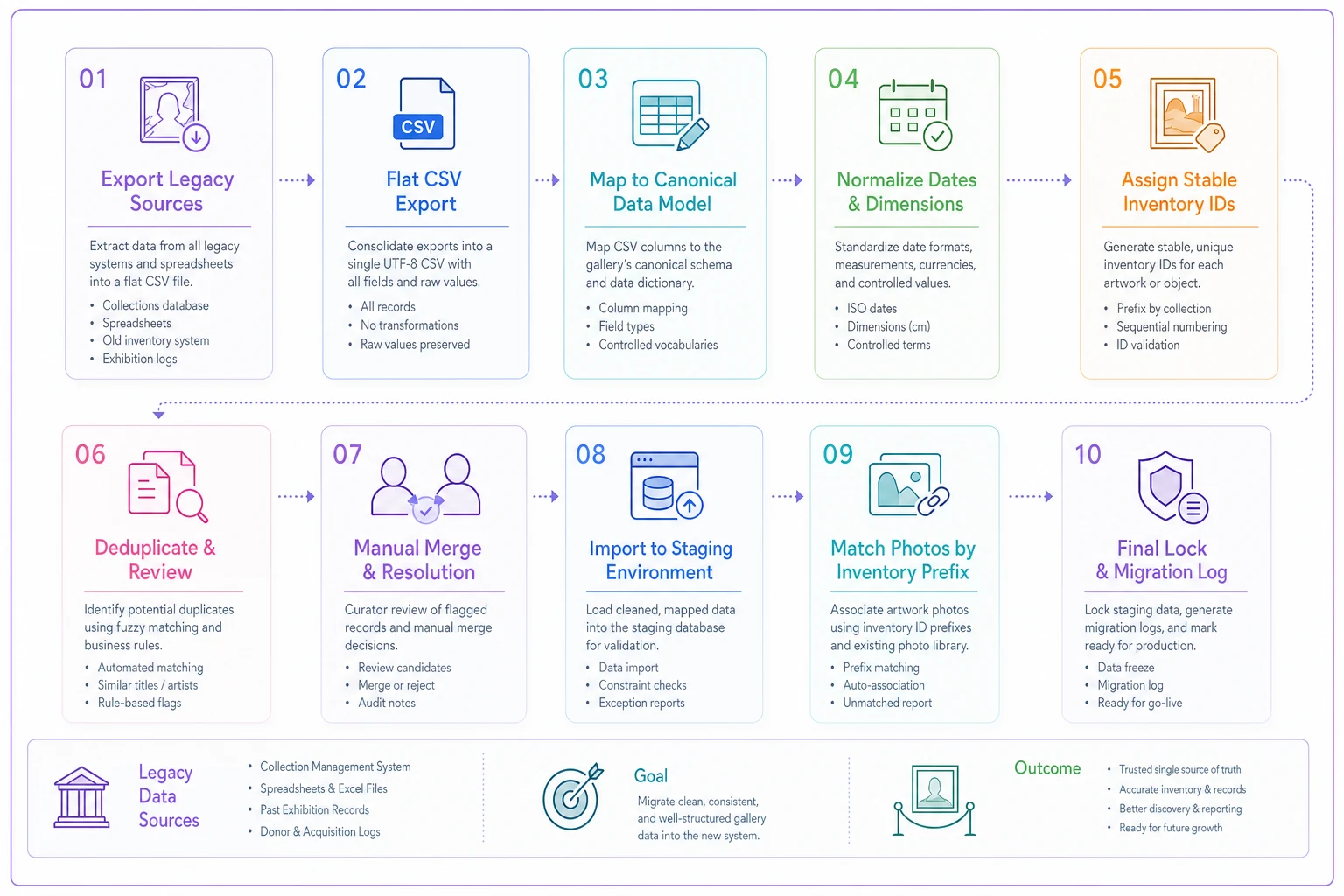
The non-obvious step is #6, the sample validation. Teams want to import everything and fix errors as they surface. In practice, errors never fully get fixed — they just get discovered one awkward moment at a time, usually in front of a collector. Thirty minutes checking a sample before import saves weeks of reactive cleanup.
A realistic before-and-after
A two-person contemporary gallery, somewhere around 300–400 works across inventory and archive, had everything spread across three overlapping spreadsheets and a shared photo drive named by camera defaults. Finding a specific piece's current location and latest price took, on a bad day, fifteen to twenty minutes of cross-referencing. Twice they'd nearly double-sold a work because the "sold" status lived in one sheet and the website pulled from another.
They spent about a week on the foundation: locking the data model, renaming roughly 900 image files to the inventory_id convention, building the controlled tag list, and running a staged migration. The dedupe pass found around 35 duplicate rows collapsing into 28 or so real works. Post-migration, locating any record dropped to under a minute, and the status-sync SOP ended the double-sale risk entirely.
Nothing about that was dramatic. No revenue miracle. Just a system that stopped quietly costing them time and credibility — and that held up as they added artists instead of getting worse.
When this level of structure is worth it — and when it isn't
If you're holding fewer than 30 works and you're the only person who ever touches the records, a single clean spreadsheet built on this data model is genuinely enough. Don't buy a platform to manage 25 paintings; buy it when the coordination cost of people exceeds the cost of the tool.
The structure becomes worth it the moment more than one person is updating records, or you're running works across multiple channels — physical space, online viewing rooms, art fairs — where a stale status in one place causes real problems. That's also when dedicated art inventory software stops being overhead and starts preventing the expensive mistakes: double sales, lost provenance, condition disputes you can't document.
Who should not rush into this: galleries in the middle of a major show with no spare hours. Migration done under deadline pressure is migration done badly. Wait a few weeks, do it properly, and import clean data once rather than fixing dirty data forever.
Closing the loop
A good inventory system isn't the software you choose — it's the discipline baked into the record before the software ever sees it. Consistent IDs, machine-readable file names, a controlled tag list, condition reports tied to actual photos, and a role matrix that says exactly who updates what and when. Get those right and almost any platform works. Get them wrong and the best platform on the market will just organize your chaos more efficiently.
Keeping that data accurate also protects you well beyond logistics — clean records and documented condition reports are part of how you stay credible with artists, collectors, and the public, which ties directly into reputation and crisis governance when something does go wrong. Start with the record. Everything else is just plumbing.
A good inventory system isn't the software you choose — it's the discipline baked into the record before the software ever sees it. Consistent IDs, machine-readable file names, a controlled tag list, condition reports tied to actual photos, and a role matrix that says exactly who updates what and when. Get those right and almost any platform works. Get them wrong and the best platform on the market will just organize your chaos more efficiently.
Keeping that data accurate also protects you well beyond logistics — clean records and documented condition reports are part of how you stay credible with artists, collectors, and the public, which ties directly into reputation and crisis governance when something does go wrong. Start with the record. Everything else is just plumbing.